Getting started
pytest-benchmem is the memory companion to pytest-benchmark: you write ordinary
pytest-benchmark tests, swap the benchmark fixture for benchmark_memory, and get
a memray peak-memory number recorded right next to the timing — same test, same
run, same JSON file. This page runs that end to end: write a benchmark, execute it,
and read both metrics back.
The fixture and memray ship with the core install; the plots and CLI need
pytest-benchmem[plot]. Memory measurement is Linux/macOS only (timing works
everywhere).
Setup
A scratch dir for the suite and JSON the cells produce; the PATH line makes the
!pytest / !benchmem cells resolve to this kernel's environment.
import os
import sys
import tempfile
from pathlib import Path
os.environ["FORCE_COLOR"] = "1"
os.environ["PATH"] = f"{Path(sys.executable).parent}{os.pathsep}{os.environ['PATH']}"
_tmp = Path(tempfile.mkdtemp(prefix="pytest-benchmem-"))
print(f"tempdir: {_tmp}")
tempdir: /tmp/pytest-benchmem-9f8p21ew
A memory benchmark — the benchmark_memory fixture
benchmark_memory depends on pytest-benchmark's benchmark fixture, so timing
rides pytest-benchmark exactly as usual. On top, it runs the action once more under
memray.Tracker — a separate, untimed pass, so the allocator hooks never touch
the timing — and stashes the memory blob in extra_info.benchmem. One node id, one
JSON entry, both metrics. Parametrize params become the analysis dims the plots
scale by, for free.
Here's a tiny suite — sorted over a range of input sizes:
suite = _tmp / "test_sortbench.py"
suite.write_text("""
import pytest
@pytest.mark.parametrize("n", [10_000, 50_000, 200_000, 500_000])
def test_sort(benchmark_memory, n):
data = list(range(n, 0, -1))
benchmark_memory(sorted, data)
""")
print(suite.read_text())
import pytest
@pytest.mark.parametrize("n", [10_000, 50_000, 200_000, 500_000])
def test_sort(benchmark_memory, n):
data = list(range(n, 0, -1))
benchmark_memory(sorted, data)
Your benchmark must be safe to re-run. Memory rides a separate invocation, after pytest-benchmark has already called your function many times for timing — so a side-effectful call (mutates a fixture, fills a cache, drains an iterator) records its already-warmed state, not a cold one, silently. Benchmark a pure call, or use the
pedanticform with asetupthat rebuilds fresh state each round.
Run it — one command, both metrics
A normal pytest invocation. --benchmark-json writes the same file pytest-benchmark
always writes; the only difference is each entry now also carries
extra_info.benchmem.
baseline = _tmp / "baseline.json"
!pytest {suite} --benchmark-only --benchmark-json={baseline} --benchmark-columns=min,median -q -p no:cacheprovider
.
.
.
. [100%]
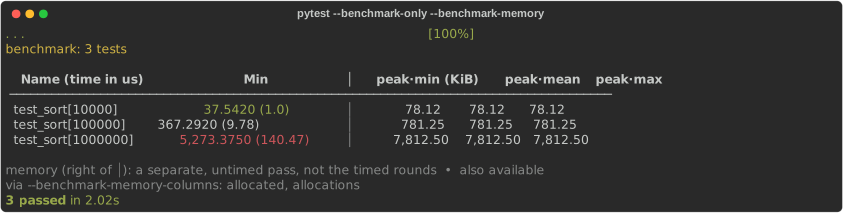
Wrote benchmark data in: <_io.BufferedWriter name='/tmp/pytest-benchmem-9f8p21ew/baseline.json'> benchmark: 4 tests Name (time in us) Min Median │ peak (MiB) allocated (MiB) allocs ───────────────────────────────────────────────────────────────────────────────────────────────────────── test_sort[10000] 51.8560 (1.0) 52.4680 (1.0) │ 0.08 0.08 1 test_sort[50000] 263.5700 (5.08) 265.1520 (5.05) │ 0.38 0.38 1 test_sort[200000] 1,067.5380 (20.59) 1,075.8400 (20.50) │ 1.53 1.53 1 test_sort[500000] 2,793.6190 (53.87) 2,987.5260 (56.94) │ 3.81 3.81 1 memory (right of │): a separate, untimed pass — single shot, not the timed rounds 4 passed in 4.34s
In the output above, pytest-benchmem folds peak, allocated, and allocs into
pytest-benchmark's own table — same columns, scaling, and sort, with the memory
columns appended on the right. One table, both metrics, no flag needed. (Prefer them
separate? --benchmark-memory-table=split prints a memory table of its own below.)
Already have a
benchmarksuite? Don't swap the fixture — add--benchmark-memoryto the run and everybenchmark(...)call records memory too, no test changes. Reach for thebenchmark_memoryfixture when you want memory on specific tests only, or thepedanticcontrol.
Read both metrics back
pytest-benchmem reads that one file per metric: from_pytest_benchmark pulls
timing (seconds, from stats), memory_from_pytest_benchmark pulls peak memory
(bytes, from extra_info.benchmem). Dims default to the parametrize params, so
each sample knows its n without anyone parsing the id.
from pytest_benchmem import from_pytest_benchmark, memory_from_pytest_benchmark
_, time_samples, tunit = from_pytest_benchmark(baseline)
_, mem_samples, munit = memory_from_pytest_benchmark(baseline)
print(f"timing ({tunit}):")
for s in time_samples:
print(f" {s.id.split('::')[-1]:<18} {s.value:.3e} dims={dict(s.dims)}")
print(f"\nmemory ({munit}):")
for s in mem_samples:
print(f" {s.id.split('::')[-1]:<18} {s.value:>10.0f} dims={dict(s.dims)}")
timing (s):
test_sort[10000] 5.186e-05 dims={'node.module': 'test_sortbench.py', 'node.func': 'test_sort', 'n': 10000}
test_sort[50000] 2.636e-04 dims={'node.module': 'test_sortbench.py', 'node.func': 'test_sort', 'n': 50000}
test_sort[200000] 1.068e-03 dims={'node.module': 'test_sortbench.py', 'node.func': 'test_sort', 'n': 200000}
test_sort[500000] 2.794e-03 dims={'node.module': 'test_sortbench.py', 'node.func': 'test_sort', 'n': 500000}
memory (B):
test_sort[10000] 80000 dims={'node.module': 'test_sortbench.py', 'node.func': 'test_sort', 'n': 10000}
test_sort[50000] 400000 dims={'node.module': 'test_sortbench.py', 'node.func': 'test_sort', 'n': 50000}
test_sort[200000] 1600000 dims={'node.module': 'test_sortbench.py', 'node.func': 'test_sort', 'n': 200000}
test_sort[500000] 4000000 dims={'node.module': 'test_sortbench.py', 'node.func': 'test_sort', 'n': 500000}
load_long_df stacks one or more runs into the tidy frame every plot pivots — one
row per (run, id) for the chosen metric, one column per dim:
from pytest_benchmem import load_long_df
df, unit = load_long_df([baseline], metric="peak")
print(f"unit: {unit}")
df
unit: B
| snapshot | id | value | node.module | node.func | n | |
|---|---|---|---|---|---|---|
| 0 | baseline | test_sortbench.py::test_sort[10000] | 80000.0 | test_sortbench.py | test_sort | 10000 |
| 1 | baseline | test_sortbench.py::test_sort[50000] | 400000.0 | test_sortbench.py | test_sort | 50000 |
| 2 | baseline | test_sortbench.py::test_sort[200000] | 1600000.0 | test_sortbench.py | test_sort | 200000 |
| 3 | baseline | test_sortbench.py::test_sort[500000] | 4000000.0 | test_sortbench.py | test_sort | 500000 |
Quick one-off — measure_peak
Outside pytest — in a REPL or notebook — measure_peak is the bare engine: hand it
a zero-arg callable, get the peak in bytes. (repeats > 1 takes the min, since peak
memory is noisy; measure_memory returns the full MemoryResult — peak, spread,
allocation count.)
from pytest_benchmem import human_bytes, measure_peak
human_bytes(measure_peak(lambda: [0] * 5_000_000))
Memray WARNING: Correcting symbol for malloc from 0x420620 to 0x7fe6976ad670 Memray WARNING: Correcting symbol for free from 0x420ab0 to 0x7fe6976add50
'38.2 MiB'